Sarathi Parivahan — Driving Licence, Status, Renewal & RC
Sarathi Parivahan is the driving licence arm of Parivahan Sewa, India’s national transport portal operated by the Ministry of Road Transport and Highways (MoRTH). It connects more than 1,300 Regional Transport Offices under one workflow, handling every stage from a new learner’s licence to the dispatch of a smart card. Below you’ll find verified government links and clear guidance for each task, mapped to the exact steps citizens face at their RTO.
Sarathi Parivahan Online Services
What Is Sarathi Parivahan?
Sarathi Parivahan is the driving-licence management platform of the Government of India’s Parivahan Sewa system, accessible at sarathi.parivahan.gov.in and administered by the Ministry of Road Transport and Highways (MoRTH). It connects the licence-issuing workflows of more than 1,300 Regional Transport Offices across every state and Union Territory through a single online interface.
The system is split into two halves: Sarathi handles everything related to drivers and licences, while Vahan handles everything related to vehicles and their registration.
Through Sarathi, citizens can apply for a Learner’s Licence, take the online LL test, apply for a Permanent Driving Licence, book a driving test slot, renew an expiring licence, apply for a duplicate if theirs is lost or damaged, add a new vehicle class, update their address, apply for an International Driving Permit, check the status of any application, and download their licence as a PDF.
The name itself is worth knowing: “Sarathi” (सारथी) comes from Sanskrit and means “charioteer” or “driver” — the person who guides the vehicle.
One clarification: the login page at
sarathi.parivahan.gov.in/sarathi/login.dois meant for RTO officials, dealers, and driving schools. Ordinary citizens do not need to log in to apply for or manage a driving licence.
Sarathi Parivahan Services — What You Can Do and Where
Sarathi is the driver-side half of Parivahan Sewa. Anything related to a person’s licence sits here; anything related to a vehicle — Registration Certificate, ownership transfer, road tax, fitness certificate, e-challan, fancy number, HSRP — sits on Vahan. If you landed on this page looking for vehicle services, go to Vehicle Services on Vahan.
| Service | What it does | Official link |
|---|---|---|
| Learner’s Licence application | Start a fresh LL application, upload documents, pay the fee | Apply for LL |
| Permanent Driving Licence application | Apply for a permanent DL after holding an LL for at least 30 days | Apply for DL |
| Driving Licence renewal | Renew a valid or expired DL (Form 9); grace period rules vary by state | Renew DL |
| Duplicate DL | Apply for a replacement if your licence is lost, stolen, or damaged (Form LLD) | Apply for Duplicate |
| Change of address on DL | Update residential address on an existing DL after moving states or localities | Change Address |
| Name correction on DL | Fix a name spelling, apply a legal name change, or update after marriage | Correct Name |
| Add a class of vehicle | Add a new COV (for example, adding LMV to an existing MCWG licence) | Add Vehicle Class |
| International Driving Permit | Apply for an IDP valid for one year for driving abroad (Form 4A) | Apply for IDP |
| Driving Licence application status | Track any Sarathi application with your application number and DOB | Check Status |
| Print / download licence | Download a digital PDF copy of your issued DL or LL | Download DL |
| Driving school licence | Apply for a new driving-school licence or renew an existing one | Driving School Services |
| Online Learner’s Licence test | Take the Aadhaar-authenticated faceless LL test from home | Online LL Test |
| Test slot booking / modification | Book, reschedule, or cancel a driving test appointment at your RTO | Book Slot |
How to Check Your Driving Licence Application Status
Checking the status of your DL, LL, or renewal application is free and takes under a minute. You don’t need a Sarathi login, a payment, or a registered account — only your application number and date of birth.
A common point of confusion: people assume they need to create an account on the portal to track an application. That account system exists, but it’s built for RTO staff, dealers, and driving schools. Ordinary citizens use the public status page directly.
Steps to check your application status:
- Open sarathi.parivahan.gov.in.
- Select your state — each state runs its own sub-portal, so the status of a Maharashtra application won’t show up under Karnataka.
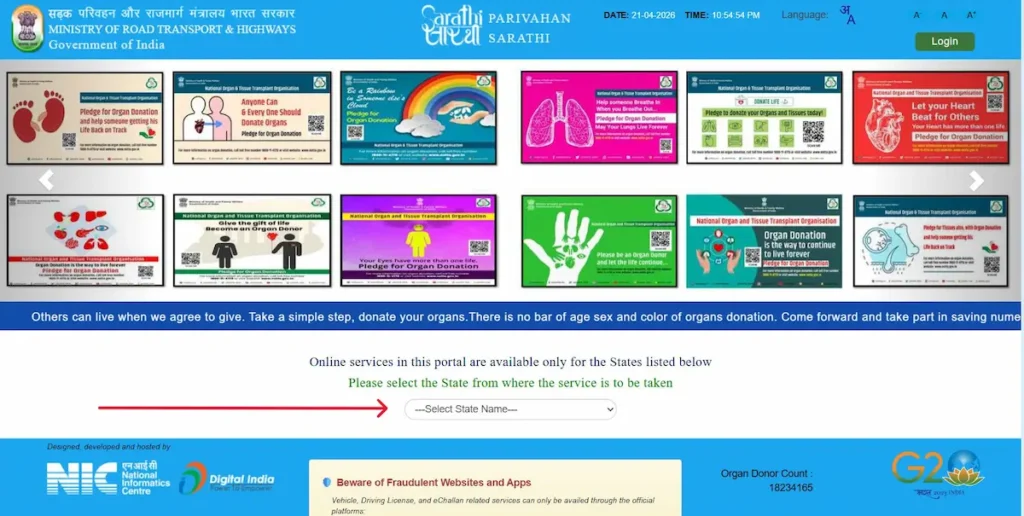
- From the menu, open Application Status.
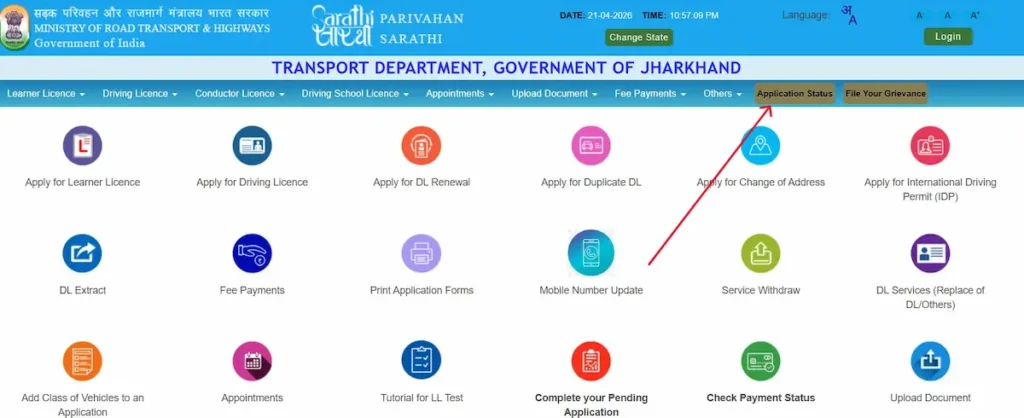
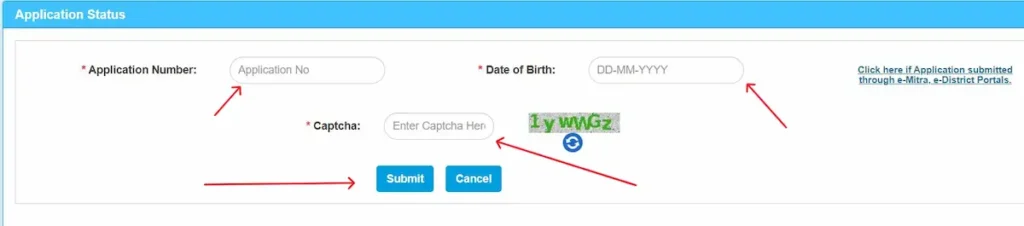
- Enter your application number, date of birth, and the captcha code shown on screen.
- Submit to see the current stage of your application.
What each status message means
- Under Process / Pending at RTO — Your application has been received but the RTO has not yet picked it up for verification. This is the default state for most applications in the first few days after submission.
- Application Under Scrutiny at RTO Level — An RTO officer is actively reviewing your documents and form. Wait for this to clear before trying to contact the RTO; scrutiny usually takes 3–7 working days.
- Approved — Your application has cleared scrutiny. For a DL, this typically means the smart card is queued for printing.
- Printed — The physical licence card has been printed but not yet handed over to the postal service.
- Dispatched / Sent to Postal Service — The card has left the RTO. You should receive it at your registered address within 7–15 working days via Speed Post.
- Delivered — India Post has marked the item as delivered. If you haven’t received it, check with your local post office using the consignment number.
- Rejected / Returned with Defects — Something in your application needs fixing: a document mismatch, a photo issue, or a signature problem. The portal usually shows a remark. Resubmit with corrections.
- Payment Pending — Your fee payment didn’t complete. Reopen the application and retry payment; the slot is usually held for a limited window.
- Biometric Pending — You need to visit the RTO in person for fingerprint and photograph capture. The application cannot progress until this step is done.
How to Apply for a Learner’s Licence on Sarathi Parivahan
The Learner’s Licence (LL) is the first and mandatory step before you can apply for a permanent Driving Licence in India. It is valid for six months from the date of issue, and in most states the entire application — form, documents, fee, and test — can now be completed online through Sarathi without visiting the RTO. Minimum age requirements are set by the Motor Vehicles Act: 16 years for gearless two-wheelers up to 50cc with written parental consent, 18 years for gearless two-wheelers above 50cc and for light motor vehicles, and 20 years for commercial and transport vehicle classes.
Documents you’ll need:
- Age proof — birth certificate, 10th marksheet, passport, or PAN card
- Address proof — Aadhaar, passport, voter ID, utility bill under 3 months old, or a registered rent agreement
- Identity proof — Aadhaar, PAN, passport, or voter ID
- Passport-sized photo and signature — digital scans that meet the portal’s size limits (typically 10–200 KB, JPEG format)
- Form 1 — self-declaration of physical fitness, required for non-transport classes
- Form 1A — medical certificate signed by a registered medical practitioner, required only if the applicant is 40+ or applying for a commercial class
Step-by-step application flow
- Go to sarathi.parivahan.gov.in and select your state.
- Open Apply for Learner Licence.
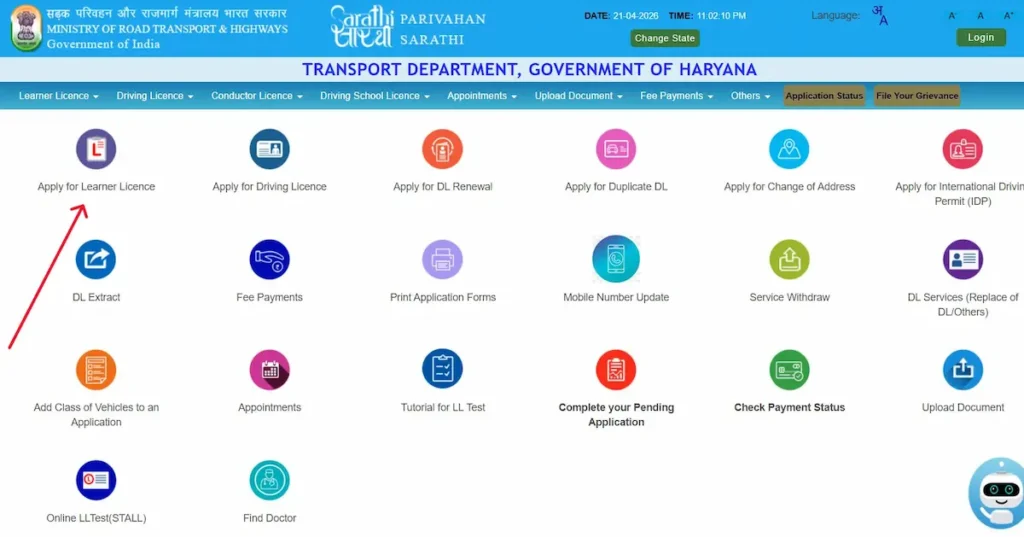
- Fill Form 2 online — personal details, address, and the vehicle class you are applying for.
- Upload scanned documents within the size and format limits the portal displays on that screen.
- Pay the fee online — the prescribed fee is ₹150 for issue of a Learner’s Licence for each class of vehicle, plus ₹50 for the Learner’s Licence test; the portal calculates the applicable total.
- Book your LL test slot. In many states this is now an online test you can take from home through the STALL (Sarathi Test for All Learner’s Licences) system with AI-based proctoring and Aadhaar authentication.
- Take the test — 20 multiple-choice questions on traffic rules and road signs. The pass mark is typically 60% (12 correct answers).
- On passing, download your Learner’s Licence PDF (Form 3) directly from the portal.
The Learner’s Licence is valid for 6 months. You must apply for the permanent DL after a minimum 30-day waiting period and before the LL expires.
How to Apply for a Permanent Driving Licence
Before applying for a Permanent Driving Licence (DL), you need to meet four prerequisites: a valid Learner’s Licence for the same vehicle class, held for at least 30 days and not more than 180 days; genuine proficiency in the vehicle category you’re applying for; no disqualification from driving imposed by any court; and a medical certificate (Form 1A) if you are over 40 or applying for a commercial class.
Steps on the Sarathi portal
- Visit sarathi.parivahan.gov.in and select your state.
- Click Apply for Driving Licence.
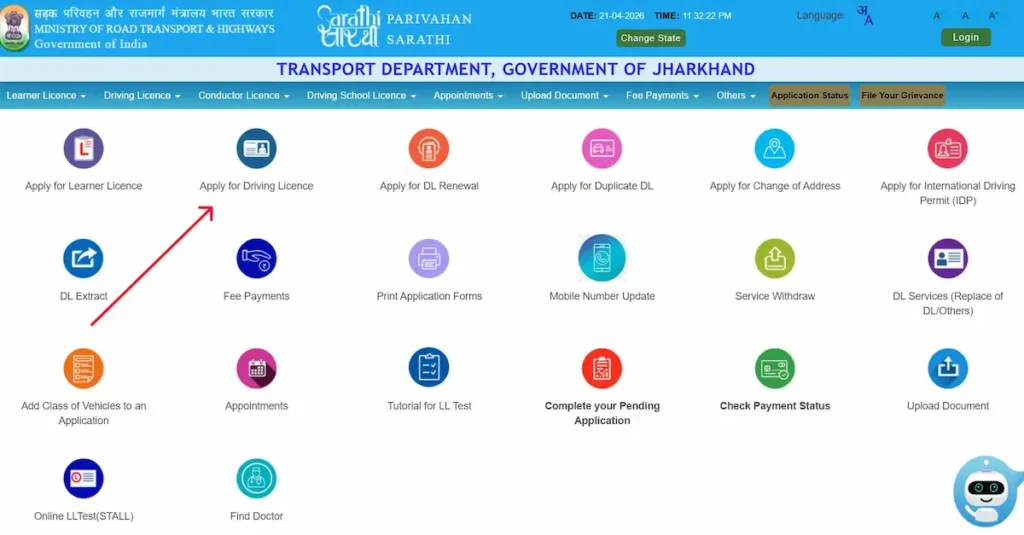
- Enter your Learner’s Licence number, date of birth, fill captcha and click Ok.
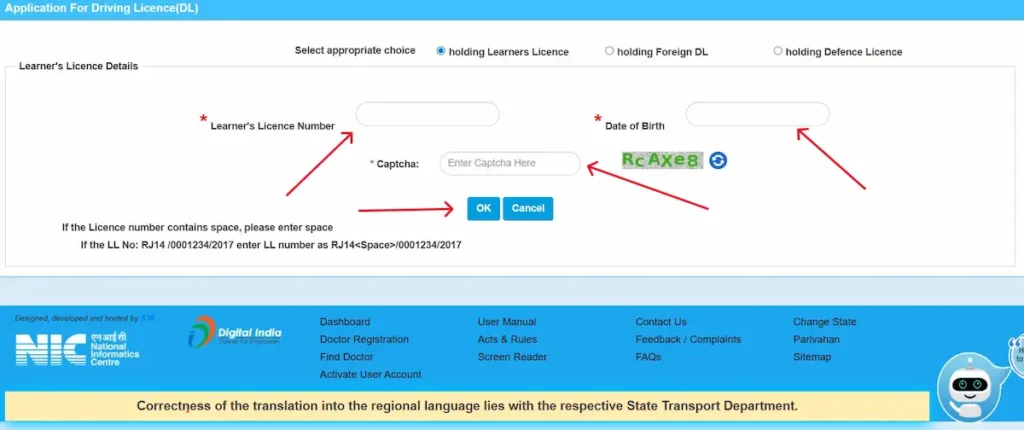
- Fill Form 4, upload any pending documents, and pay the fee (₹200 for DL issue plus ₹300 test fee, per MoRTH’s standard schedule).
- Book a slot for the practical driving test at your nearest RTO.
- On test day, bring the original documents listed on your acknowledgement receipt, along with the vehicle you’re being tested on — it must have valid RC, insurance, and PUC.
What happens on test day
The Motor Vehicle Inspector (MVI) assesses five things: vehicle control, parking, signalling, adherence to traffic rules, and general road sense. Two-wheeler tests are typically conducted on an 8-figure track; four-wheeler tests use an H-shaped or T-shaped track, depending on the RTO.
If you pass, your licence is printed and dispatched to your registered address by Speed Post, typically within 15–30 working days. If you fail, you can re-test after a 7-day cooling period with a re-test fee of ₹300.
Validity: For a non-transport DL, if the holder is under 30 at issue or renewal, it is valid until age 40; if aged 30 to under 50, it is valid for 10 years; if aged 50 to under 55, it is valid until age 60; and if aged 55 or above, it is valid for 5 years. A licence to drive a transport vehicle is generally valid for 5 years.
Driving Licence Renewal — Timing, Fees and What Happens
Yes, you can renew your driving licence online in most states through Sarathi, and yes, you can still renew it after expiry. The rules and costs depend entirely on how late you are.
- Renewing up to one year before expiry — the smoothest path. Your new validity continues from the original expiry date, and no late fee applies.
- Renewing within one year after expiry — you’re still inside the statutory grace period. Only the standard renewal fee applies.
- Renewing more than one year after expiry — the applicant must undergo the prescribed re-test. The prescribed late-renewal fee is ₹300, with an additional ₹1,000 for each year or part thereof of delay reckoned from the expiry of the grace period.
- Expired more than one year ago — renewal requires the applicant to undergo the prescribed re-test for the categories of vehicles to be driven.
Documents for renewal
Current DL, Form 1 self-declaration (non-transport) or Form 1A medical certificate (commercial DL or age 40+), proof of address if it has changed since issue, and one recent passport-sized photo.
The renewal flow on Sarathi
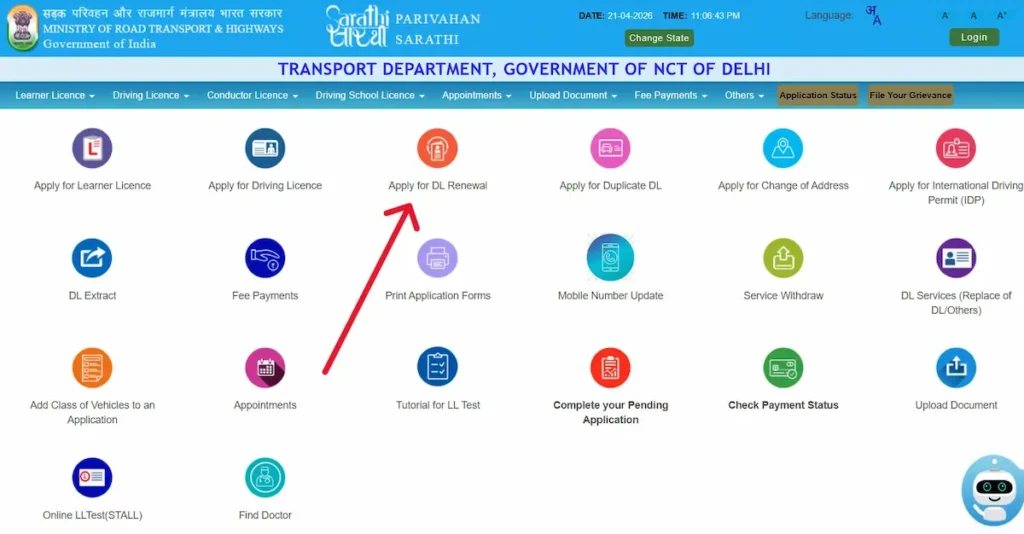
- Go to sarathi.parivahan.gov.in.
- Select your state.
- Click “Apply for DL Renewal”
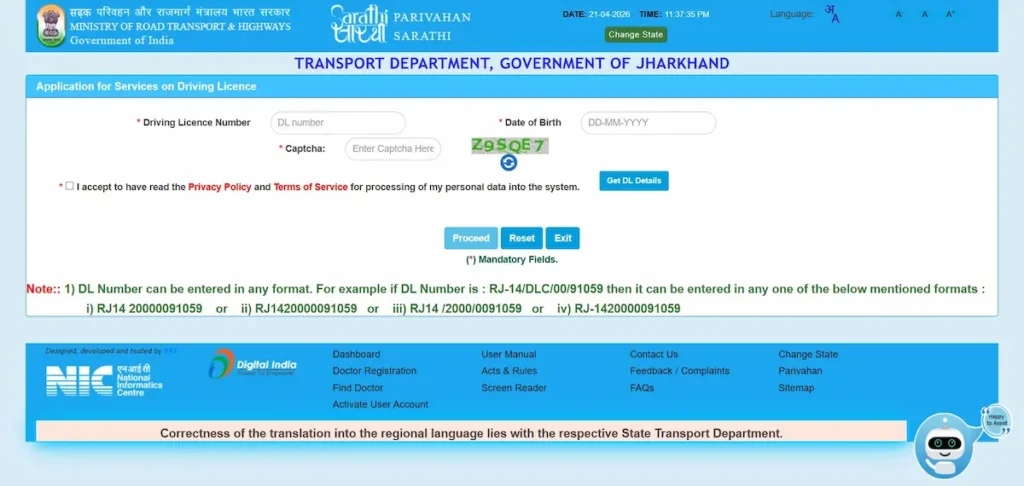
- Enter your DL number, complete captcha verification and enter date of birth
- Confirm the pre-filled details and upload required documents
- Pay the renewal fee online
- For transport/commercial renewals and in some states for non-transport too, visit the RTO with originals for verification
- The renewed licence is dispatched by post and also made available in DigiLocker and mParivahan
Note: if your state still requires a biometric appointment for renewal (several do), the online portion only books your slot — plan for one physical RTO visit.
How to Download or Print Your Driving Licence
Three legitimate routes, all equally valid:
- Sarathi portal — parivahan.gov.in → Driving Licence Related Services → your state → Print Driving Licence → enter DL number and date of birth → download the PDF.
- DigiLocker app — log in with Aadhaar → search “Driving Licence” under Ministry of Road Transport and Highways → enter your DL number → the document is fetched automatically from the RTO database.
- NextGen mParivahan app — download from the Play Store or App Store → register with your mobile number and MPIN → open My DL → Create Virtual DL.
Electronic driving-licence records available through DigiLocker or mParivahan are legally recognised at par with the original documents. MoRTH’s official procedure also permits citizens to download the Driving Licence through these apps and store it on their mobile devices for presentation to enforcement agencies.
Duplicate Driving Licence — If You’ve Lost It, Damaged It or Had It Stolen
A duplicate DL is issued on three legitimate grounds: the licence is lost, stolen, or damaged to the point of illegibility. A photo refresh on a very old card is also a valid reason the RTO will accept.
What to arrange first
- File an FIR or NCR at your local police station if the DL is lost or stolen — the online application will not progress without it.
- Keep scanned copies of the FIR, any photocopy of your old DL you still have, identity proof, and address proof.
The flow on Sarathi
- Visit sarathi.parivahan.gov.in.
- Select your state.
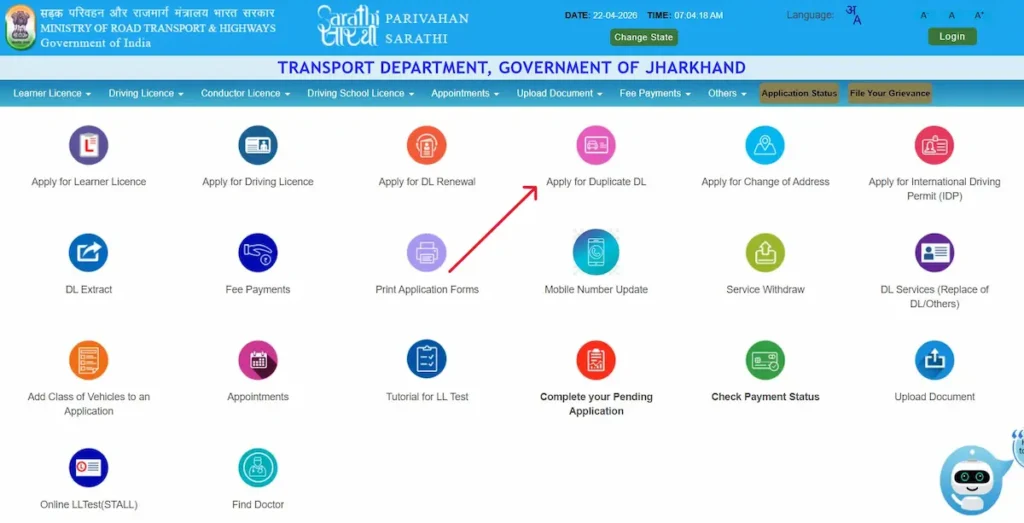
- Click “Apply for Duplicate DL“
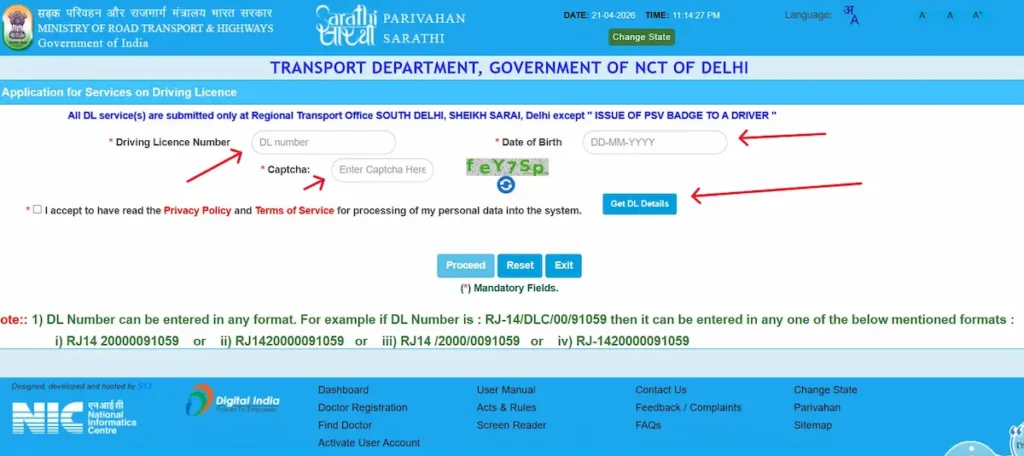
- Enter your DL number, date of birth and fill cpatcha.
- click Get DL Details
- Confirm the pre-filled information and add your current mobile number, email, and address
- Select Issue of Duplicate DL and complete the Form 2 self-declaration
- Upload the FIR (if lost or stolen), identity proof, and address proof
- Pay the duplicate DL fee — typically ₹250 (confirm at the payment screen)
- Book an appointment if your state requires biometric re-verification
- Receive the duplicate by post at your registered address
Point: if you find your original DL after applying for a duplicate, you are legally required to surrender one of them at the RTO. Holding two valid licences for the same class is an offence under the Motor Vehicles Act.
Sarathi Parivahan Login: What You Need to Know
Applying for a licence, checking application status, paying fees, downloading your DL, and booking a test slot can all be done without logging in anywhere. You only need an application number and date of birth.
Who the login is actually for:
- Citizens (you): no login required. Use the public service pages directly from parivahan.gov.in.
- Driving schools, dealers, RTO officials, and dispatch staff: a Sarathi dashboard login exists at
sarathi.parivahan.gov.in/sarathi/login.dofor internal operations, reporting, and record management. Ordinary applicants cannot use it and do not need it. - mParivahan and DigiLocker apps: these use separate logins tied to your mobile number or Aadhaar for accessing your digital DL and RC. They are not connected to the Sarathi staff login.
If a page asks you to log in during a routine citizen task like a status check or renewal, you are either on the wrong sub-page or on a third-party site pretending to be official. Always check the URL — it should end in parivahan.gov.in.
Fees on Sarathi Parivahan — What You’ll Actually Pay
Fees are set centrally by MoRTH under the Central Motor Vehicles Rules (CMVR), but individual states add minor service and courier charges, so the final amount can vary slightly. Trust the number the portal shows on the payment screen over any published article, including this one.
| Service | Base fee (INR) |
|---|---|
| Learner’s licence issue | 150 |
| Learner’s licence test | 50 |
| Permanent driving licence issue | 200 |
| Driving licence test | 300 |
| Driving licence renewal | 200 |
| Late renewal (after one-year grace) | 300 + 1,000 for each year or part thereof of delay |
| Duplicate DL | 250 |
| Addition of class | 500 |
| International Driving Permit | 1,000 |
| Smart card (most states) | 200 |
- Payment methods: UPI, net banking, debit card, and credit card are all accepted.
- If money is debited but status shows “Payment Pending”: do not re-apply immediately. Wait 48 hours for state treasury reconciliation, then use the portal’s Verify Payment Status tool (under Fee Payment → Verify Payment) before attempting a fresh payment. Double-paying creates a refund loop that takes 15–30 working days to resolve at the RTO’s accounts section.
Common Problems on Sarathi Portal and How to Fix Them
- Payment debited but application status shows unpaid. A handshake delay between the State Treasury and the Parivahan server. Wait 24–48 hours, then go to Fee Payments → Verify Payment Status and enter your application number and date of birth. Don’t re-pay. If nothing resolves within 7 working days, banks usually auto-refund the amount.
- Photo or signature upload rejected. Size or format mismatch. Photo is typically 10–50 KB JPEG; signature is typically 5–20 KB JPEG. Rename files without spaces or special characters before uploading —
aadhaar.pdfworks,My Aadhaar Card.pdfoften fails silently. - Aadhaar e-KYC name mismatch. The portal requires an exact string match. If your name reads even slightly differently on Aadhaar versus your other documents, either update Aadhaar first through UIDAI’s self-service portal, or skip the e-KYC route and choose the physical-verification flow at the RTO.
- No test slots available for weeks. Slots are released in batches, typically around 10 AM and 11 AM on working days. Try then, on a desktop rather than a mobile browser, and switch browsers if the calendar widget freezes.
- OTP not arriving. The mobile number linked to your Sarathi record is probably outdated. Use the Mobile Number Update facility on parivahan.gov.in, or ask your RTO to update it directly in the system.
- DL status hasn’t updated for 15+ working days. There’s a physical task pending on your file at the RTO — scrutiny, printing, or dispatch. Call the RTO enquiry desk with your application number; the online status will not move until someone there acts.
- NextGen mParivahan login loop. Clear the app’s cache and data, then reinstall. Avoid public Wi-Fi and turn off any active VPN. Peak server hours are 11 AM–2 PM on weekdays; try after 9 PM if it keeps failing.
- Captcha won’t render. Usually a browser extension blocking the script. Open the page in incognito mode or a different browser.
If none of these work, your state’s RTO enquiry line is the faster path — numbers are listed on parivahan.gov.in under Contact Us.
Check Vehicle Insurance Status (Not on Sarathi — Here’s Where)
Insurance is a vehicle detail, not a driver detail, so it lives on the Vahan side of the Parivahan system, not on Sarathi. If you searched “sarathi parivahan insurance status,” you’re in the right neighbourhood but the wrong door.
Three legitimate ways to check:
- Vahan “Know Your Vehicle Details” — parivahan.gov.in → Informational Services → Know Your Vehicle Details → log in with mobile OTP → enter the registration number. The output includes insurer name, policy number, and expiry date.
- NextGen mParivahan app — search by registration number; insurance validity is shown alongside RC and pollution details.
- IIB portal (Insurance Information Bureau) — maintains insurance records from April 2010 onward. Useful when Vahan doesn’t show current data, though new policies can take a few weeks to appear in IIB.
One caveat worth knowing: if your insurer hasn’t uploaded the latest policy to the IIB or Vahan database yet — which can take up to 2 months after purchase — the portal may still show your older status. Don’t panic. Call your insurer to confirm the policy is active on their end; that’s what matters for a claim.
If your check shows the policy has lapsed, it is illegal to drive under the Motor Vehicles Act. Most insurers allow online renewal in under 10 minutes, and premiums can vary significantly between providers for the same vehicle, so it’s worth comparing current quotes on a licensed aggregator before renewing with your existing insurer by default.
mParivahan, DigiLocker and the Digital DL — Which One Should You Use?
Electronic DL and RC records available through mParivahan and DigiLocker are legally recognised at par with the original documents. MoRTH’s procedure permits citizens to download these documents through the apps and store them on their mobile devices for presentation to enforcement agencies.
- NextGen mParivahan is built by the National Informatics Centre for the Ministry of Road Transport and Highways. It focuses specifically on transport documents: Virtual DL, Virtual RC, e-challan check and payment, and vehicle owner search. It’s often faster during roadside checks because data is pulled directly from the Sarathi and Vahan servers.
- DigiLocker is a broader government document wallet. It holds PAN, Aadhaar, marksheets, and other identity documents alongside your transport records. If you want a single app for all government IDs, DigiLocker is the better fit.
Drivers Should: keep both. Use mParivahan during roadside checks for speed, and rely on DigiLocker as a backup in case one app is down or misbehaving at the moment you need it.
Frequently Asked Questions
Is Sarathi Parivahan the same as Parivahan Sewa?
Not quite. Parivahan Sewa is the master portal run by MoRTH. Sarathi is the driving-licence half of that system, and Vahan is the vehicle half.
Do I need to log in to apply for a driving licence on Sarathi?
No. Citizen services don’t require an account. You only need your application number and date of birth to apply, track, or renew.
How long does a driving licence take after applying online?
Typically 15–30 working days after you pass the practical test. Delays depend on RTO workload and Speed Post dispatch times in your state.
Can I renew my driving licence after it has expired?
Yes. If the application for renewal is made more than one year after expiry, the applicant must undergo the prescribed re-test for the categories of vehicles to be driven.
Is the digital driving licence in DigiLocker or mParivahan legally valid?
Yes. It is accepted by traffic police under MoRTH’s August 2018 circular and the IT Act, 2000. A screenshot saved as an image is not equivalent — the file must be opened live from within the app.
What if my payment is debited but status shows pending?
Wait 48 hours for state treasury reconciliation, then use Verify Payment Status on the portal. Do not re-pay — duplicate payments take weeks to refund.
What’s the difference between Sarathi and the state RTO portal?
Sarathi is the central platform that every state’s DL services flow through. State RTO portals handle local-only services and occasionally redirect to their own pages for specific tasks.
Contact the Official Parivahan Helpdesk
For issues the portal can’t resolve, use the Government of India’s official helpdesks:
- Vehicle issues (Vahan): helpdesk-vahan@gov.in
- Licensing issues (Sarathi): helpdesk-sarathi@gov.in
- mParivahan app: mailto:helpdesk-mparivahan@gov.in
- eChallan: helpdesk-echallan@gov.in
- General helpline: +91-120-4925505